Welcome to ViM User Manual
1. About
1.1. ViVA Integration Module (ViM)
ViM is the integrated module for VIral Variome Analyser (VIVA) that allows users to run SEVANT, IDTA, ViTA, DiTA, and CROSTA applications from one single interface. ViM also supports pipelined tasks as well where the applications (with exception for CROSTA) can run concurrently or one-after-another.
1.2. Accesibility
The webserver is publicly available at: https://vim.bezmialem.edu.tr/
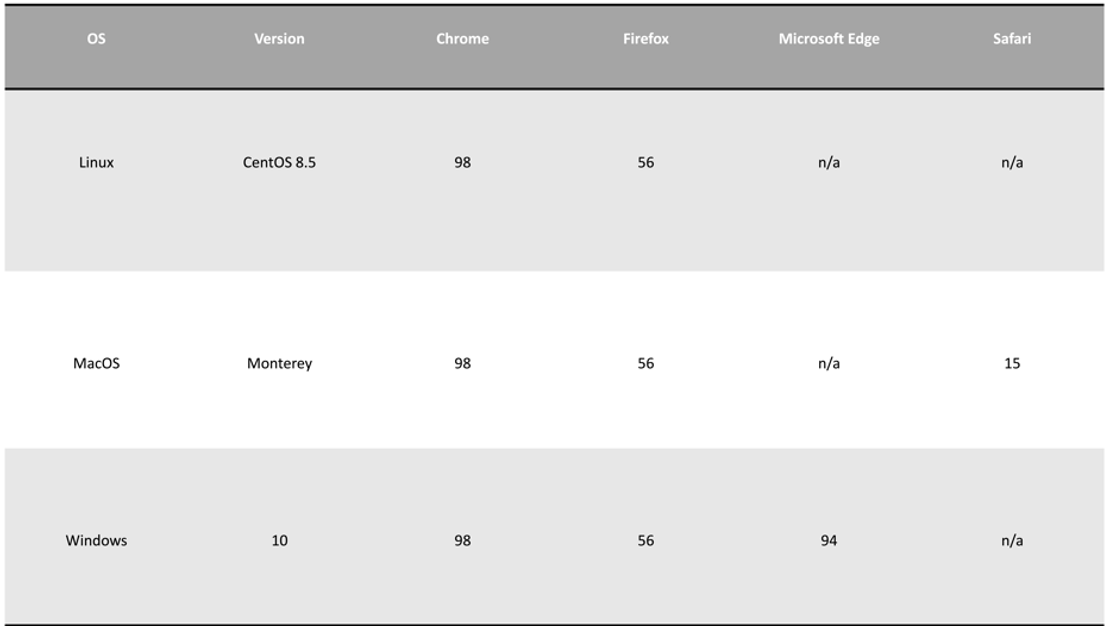
1.3. Browser compatibility
1.4. Workflow

Figure 1. It is a three-step process that begins with selection of the application/module to run. In the second step, a multiple alignment file or DiMA generated JSPN file is uploaded. Information about the viral taxonomy ID, the name of the viral protein being analysed and the isolation host is provided by the user. The last step is the revelation of the results.
2. Input file and parameters
2.1. Input file
VIM accepts four file types. Three of them are multiple sequence alignment file types: 1- FASTA (.afa) 2- CLUSTAL (.aln) 3- Tabulated aligned file (.taln) 4- DiMA generated JSON (.json) file type.
2.2. Parameters
The paramaters that are common for each module are as follows:
2.2.1. Taxonomy ID
The user has to enter the taxonomy ID of the organism being analysed. If necessary, the user can go to the (NCBI Taxonomy Database)[https://www.ncbi.nlm.nih.gov/taxonomy] to search for the Taxonomy ID.
2.2.3. Isolation host
The next field is isolation host. This is the source organisms from where the sequences being analysed have been isolated from, such as human or avian.
3. Exampler results of modules
3.1. Select the module to run
There are five modules to select from: SEVANT, IDTA, ViTA, DiTA, CROSTA. The first four (4) modules can be run independently or as a pipleline by selecting them all. All of them use the same file input type (see: Acceptable file formats), MSA file format. CROSTA is run independently as it accepts two files instead of one and its interpretation and outputs differ from the other modules.
3.2. VIM exampler results
See SEVANT output here: (link)
See MOSWA output here: (link)
See IDTA output here: (link)
See VITA output here: (link)
See DiTA output here: (link)
See CROSTA output here: (link)
4. FAQs and Support
4.1. FAQs
How to cite? For now: https:\vim.bezmialem.edu.tr
4.2. Contact and support
Please don’t hesitate to reach out to the developers for your questions, comments, or other feedback through mailing makhan@bezmialem.edu.tr.